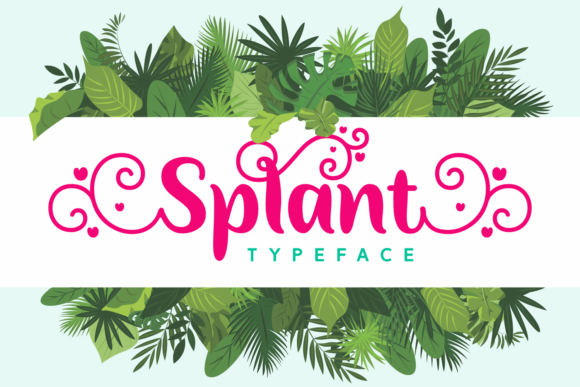
Splant: A Charming Script Font for Web Design
It was a late afternoon when I first tested Splant on my client's boutique website. The goal was simple—refresh the hero section with something that felt both elegant and approachable. As I imported the font into the design tool, I immediately noticed how its swashes and ligatures added a sense of movement and warmth to the headline. It wasn’t just a font; it was a visual storytelling tool.
Splant is a script font from Script Amp that feels equally charming and elegant. Its gorgeous swashes and ligatures make this typeface incredibly versatile, allowing it to fit into a wide variety of digital contexts. Whether you're designing a creative portfolio, an online store, or a course landing page, Splant brings a unique personality that stands out without overwhelming the user experience.
Visual Personality and Digital Appeal
Splant has a distinct visual character that leans toward the handwritten but remains highly refined. It’s not too cursive, nor is it overly ornate. Instead, it strikes a balance between casual charm and professional elegance. This makes it ideal for websites that want to convey creativity without sacrificing readability.
The font’s style works well in digital environments where a touch of personality can elevate the brand identity. It adds emotional appeal, which is especially useful for creative businesses, coaching sites, or boutique stores looking to connect with their audience on a more personal level.
Real-World Applications in Web Layouts
I tested Splant across several sections of the boutique site, starting with the hero section. Placed over a full-width image banner, the font looked stunning. It didn’t clash with the background, and the text remained legible even at a larger size. The swashes gave it a fluid feel, making the headline feel inviting rather than rigid.
Next, I used it for a call-to-action button. While Splant isn’t suitable for long paragraphs or small text, it worked beautifully for short phrases like “Shop Now” or “Explore More.” The font’s decorative elements made the buttons stand out while maintaining a cohesive brand look.
In the blog section, I paired Splant with a clean sans serif font for body copy. This combination created a nice contrast—Splant handled the headings and titles, while the sans serif took care of the rest. It helped establish a clear visual hierarchy, guiding users through the content effortlessly.
Responsive Design Considerations
One of the most important aspects of using any font on the web is ensuring it looks good on all screen sizes. I tested Splant on mobile and found that it scaled well, though I did notice some minor issues with the swashes at very small sizes. For smaller screens, I recommend keeping the font size above 16px and avoiding overly complex ligatures if the text needs to be scannable.
On dark backgrounds, Splant still performed well, especially when paired with a light color palette. However, for accessibility reasons, it’s crucial to ensure sufficient contrast between the font and background. I used a high-contrast color combination to maintain readability across different devices.
Font Pairing and Brand Consistency
When working with Splant, I found that pairing it with a simple sans serif font like Helvetica or Arial created a balanced look. This combination worked particularly well for editorial-style websites, where the script font added a creative flair to headlines, while the sans serif kept the body copy clean and easy to read.
For more modern or minimalist designs, I experimented with a bold display font alongside Splant. This approach allowed the brand to maintain a consistent visual language across different sections of the site. It also helped reinforce the brand identity by using a cohesive set of fonts throughout the project.
What Works and What Doesn’t
Splant shines in display use—hero sections, logos, and decorative accents. It’s perfect for short phrases and headlines but not recommended for long paragraphs, form labels, or navigation menus. Its decorative nature can reduce readability in these contexts, so it’s best reserved for areas where visual impact is more important than pure legibility.
Before implementing Splant on any live site, it’s essential to check the included styles, weights, and file formats. I also made sure to verify that the font supports multilingual characters and has proper commercial licensing. These steps are crucial for ensuring that the font meets both functional and legal requirements for web projects.
Overall, Splant is a versatile and beautiful script font that adds a warm, elegant touch to any digital design. When used thoughtfully, it can enhance brand identity, improve user engagement, and create a memorable online experience. Just remember to pair it wisely and avoid using it in contexts where readability takes precedence over aesthetics.